

In this part of this series, you will try to create unit tests for a Spring Boot application using an AI coding assistant. The goal is not to just merely create working unit tests, but to create qualitative unit tests. Enjoy!
1. Introduction
Nowadays, many AI coding assistants are available. These are demonstrated during conferences, in videos, described in blogs, etc. The demos are often impressive and it seems that AI is able to generate almost all of the source code for you. You only need to review it. However, when you start using AI coding assistants at work, it just seems that it is not working for you and it only costs you more time. The truth lies somewhere in between. AI coding assistants can save you a lot of time for certain tasks, but they also have some limitations. It is important to learn which tasks will help you and how to recognize when you hit the limits of AI. Beware that AI is evolving in a fast pace, so the limitations of today may be resolved in the near future.
In the remainder of this blog, you will try to generate unit tests for a basic Spring Boot application with the help of an AI coding assistant. The responses are evaluated and different techniques are applied which can be used to improve the responses when necessary. This blog is part of a series, the previous parts can be read here:
- Unlocking AI Coding Assistants: Real-World Use Cases Part 1
- Unlocking AI Coding Assistants: Real-World Use Cases Part 2
- Unlocking AI Coding Assistants: Real-World Use Cases Part 3
- Unlocking AI Coding Assistants: Generate Spring Boot Application
A basic Spring Boot application has been generated in a previous blog. This application will be used to generate unit tests for. The starting point will be the last branch from that post.
The tasks are executed with the IntelliJ IDEA DevoxxGenie AI coding assistant.
The setup used in this blog is LMStudio as inference engine and qwen2.5-coder:7b as model. This runs on GPU.
As you can see, local running models are used. Reason for doing so is that you will hit the limits of a model earlier.
The sources used in this blog are available at GitHub. The explanation of how the project is created, can be found here.
2. Prerequisites
Prerequisites for reading this blog are:
- Basis coding knowledge;
- Basic knowledge of AI coding assistants;
- Basic knowledge of DevoxxGenie, for more information you can read a previous blog or watch the conference talk given at Devoxx.
3. Generate Controller Test
Let’s create a unit test for the CustomersController class.
3.1 Prompt
The command utility /test expands to the following prompt.
Write a unit test for this code using JUnit.
Using this prompt will generate a more general test. This is not useful for this use case.
For a Controller test, the following extra requirements apply:
- WebMvcTest must be used;
- MockMvc must be used;
- AssertJ assertions must be used.
Open file CustomersController and enter the prompt.
Write a unit test for this code using JUnit.
Use WebMvcTest.
Use MockMvc.
Use AssertJ assertions.
3.2 Response
The response can be viewed here.
3.3 Apply Response
Create package com/mydeveloperplanet/myaicodeprojectplanet/controller in the src/test/java directory and copy the response in file CustomersControllerTest.
Some issues exist:
- Imports need to be added, but IntelliJ will help you with that.
- The
convertToDomainModelmethod from theCustomersControlleris used, but this is a private method.
3.4 Prompt
Enter a follow-up prompt.
The convertToDomainModel method is used, but is not accessible.
Create the Customer object in a similar way as the openAPICustomer object.
3.5 Response
The response can be viewed here.
3.6 Apply Response
A convertToDomainModel method is added to the test.
Again, fix the imports. The test class does compile now and the tests can be executed and are successful.
Looking at the tests themselves, they look quite ok, but the code can be improved:
- The
testCustomersPostshould not contain the id in the request. - The Post and Put JSON content could be text blocks.
- Maybe the
convertToDomainModelshould not be used because it is to close to the implementation.
3.7 Test Quality
Can you check the test quality? Of course, you can test the quality of your tests by means of mutation tests (pitest-maven plugin).
Add the following plugin to the build-section of the pom.
<plugin>
    <groupId>org.pitest</groupId>
    <artifactId>pitest-maven</artifactId>
    <version>${pitest-maven.version}</version>
    <dependencies>
        <dependency>
            <groupId>org.pitest</groupId>
            <artifactId>pitest-junit5-plugin</artifactId>
            <version>${pitest-junit5-plugin.version}</version>
        </dependency>
    </dependencies>
    <executions>
        <execution>
            <goals>
                <goal>mutationCoverage</goal>
            </goals>
            <configuration>
                <features>
                    <feature>+auto_threads</feature>
                </features>
                <jvmArgs>
                    <jvmArg>-XX:+EnableDynamicAgentLoading</jvmArg>
                </jvmArgs>
            </configuration>
        </execution>
    </executions>
</plugin>
Run the build.
mvn clean verify
In directory target/pit-reports the report can be found.
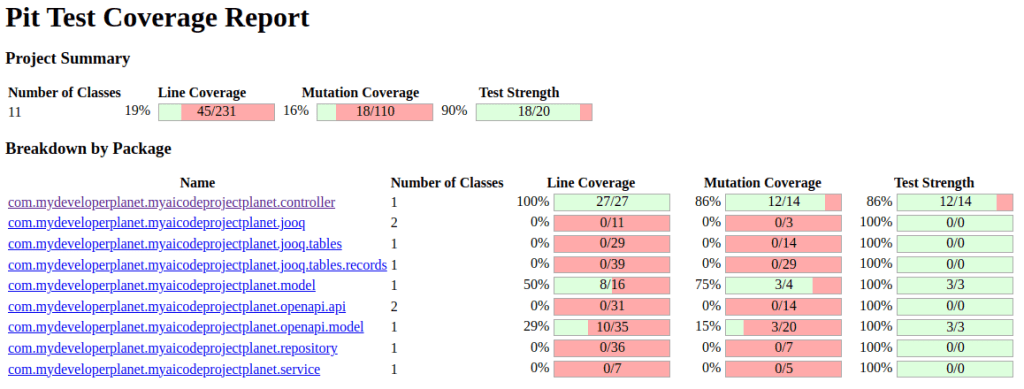
The mutation test result shows a 100% line coverage and an 86% mutation coverage for the controller package. This is quite good. This means that the tests still can be improved.
4. Generate Service Test
Let’s create a unit test for the CustomerServiceImpl class.
4.1 Prompt
Open the CustomerServiceImpl file and enter the prompt.
Write a unit test for this code using JUnit.
Use AssertJ assertions.
Use Mockito.
4.2 Response
The response can be viewed here.
4.3 Apply Response
Create package com.mydeveloperplanet.myaicodeprojectplanet.service in directory src/test/java and copy the response in file CustomerServiceImplTest.
Some issues exist:
- You need to fix some imports.
- Some compile errors exist when creating a
Customer. The constructor needs an id, a first name and a last name. - The
setUpmethod is not really required if you annotate the class with@ExtendWith(MockitoExtension.class)
4.4 Prompt
Let’s see if it makes a difference if the full project is added to the Prompt Context.
Open a new chat window and add the full project to the Prompt Context. Enter the prompt.
Write a unit test for class CustomerServiceImpl using JUnit.
Use AssertJ assertions.
Use Mockito.
4.5 Response
The response can be viewed here.
4.6 Apply Response
This did not change much. Less imports were present, but the same problem with the Customer object exists.
Fix this manually and run the tests.
Three tests pass, two fail.
Test testCreateCustomer fails due to the following error:
org.opentest4j.AssertionFailedError:
expected: "Customer{id=1, firstName='John', lastName='Doe'} (Customer@2160e52a)"
 but was: "Customer{id=1, firstName='John', lastName='Doe'} (Customer@3d7cc3cb)"
Expected :Customer{id=1, firstName='John', lastName='Doe'}
Actual   :Customer{id=1, firstName='John', lastName='Doe'}
<Click to see difference>


	at com.mydeveloperplanet.myaicodeprojectplanet.service.CustomerServiceImplTest.testCreateCustomer(CustomerServiceImplTest.java:63)
	at java.base/java.lang.reflect.Method.invoke(Method.java:580)
	at java.base/java.util.ArrayList.forEach(ArrayList.java:1596)
	at java.base/java.util.ArrayList.forEach(ArrayList.java:1596)
The domain object does not implement the equals method. For now, fix it in the test.
assertThat(result.getId()).isEqualTo(1L);
assertThat(result.getFirstName()).isEqualTo("John");
assertThat(result.getLastName()).isEqualTo("Doe");
Test testUpdateCustomer fails due to the following error:
org.mockito.exceptions.misusing.InvalidUseOfMatchersException:
Invalid use of argument matchers!
2 matchers expected, 1 recorded:
-> at com.mydeveloperplanet.myaicodeprojectplanet.service.CustomerServiceImplTest.testUpdateCustomer(CustomerServiceImplTest.java:76)

This exception may occur if matchers are combined with raw values:
//incorrect:
someMethod(any(), "raw String");
When using matchers, all arguments have to be provided by matchers.
For example:
//correct:
someMethod(any(), eq("String by matcher"));

For more info see javadoc for Matchers class.


at com.mydeveloperplanet.myaicodeprojectplanet.repository.CustomerRepository.updateCustomer(CustomerRepository.java:45)
at com.mydeveloperplanet.myaicodeprojectplanet.service.CustomerServiceImplTest.testUpdateCustomer(CustomerServiceImplTest.java:76)
at java.base/java.lang.reflect.Method.invoke(Method.java:580)
at java.base/java.util.ArrayList.forEach(ArrayList.java:1596)
at java.base/java.util.ArrayList.forEach(ArrayList.java:1596)
4.7 Prompt
Let’s try to fix this. Enter the prompt.
    testUpdateCustomer fails due to the following error:
    ```
    org.mockito.exceptions.misusing.InvalidUseOfMatchersException:
    Invalid use of argument matchers!
    2 matchers expected, 1 recorded:
    -> at com.mydeveloperplanet.myaicodeprojectplanet.service.CustomerServiceImplTest.testUpdateCustomer(CustomerServiceImplTest.java:76)

    This exception may occur if matchers are combined with raw values:
    //incorrect:
    someMethod(any(), "raw String");
    When using matchers, all arguments have to be provided by matchers.
    For example:
    //correct:
    someMethod(any(), eq("String by matcher"));

    For more info see javadoc for Matchers class.


    at com.mydeveloperplanet.myaicodeprojectplanet.repository.CustomerRepository.updateCustomer(CustomerRepository.java:45)
    at com.mydeveloperplanet.myaicodeprojectplanet.service.CustomerServiceImplTest.testUpdateCustomer(CustomerServiceImplTest.java:76)
    at java.base/java.lang.reflect.Method.invoke(Method.java:580)
    at java.base/java.util.ArrayList.forEach(ArrayList.java:1596)
    at java.base/java.util.ArrayList.forEach(ArrayList.java:1596)
    ```
4.8 Response
The response can be viewed here.
4.9 Apply Response
Apply the fix and the test is successful now.
4.10 Test Quality
Run the build and verify the test quality.
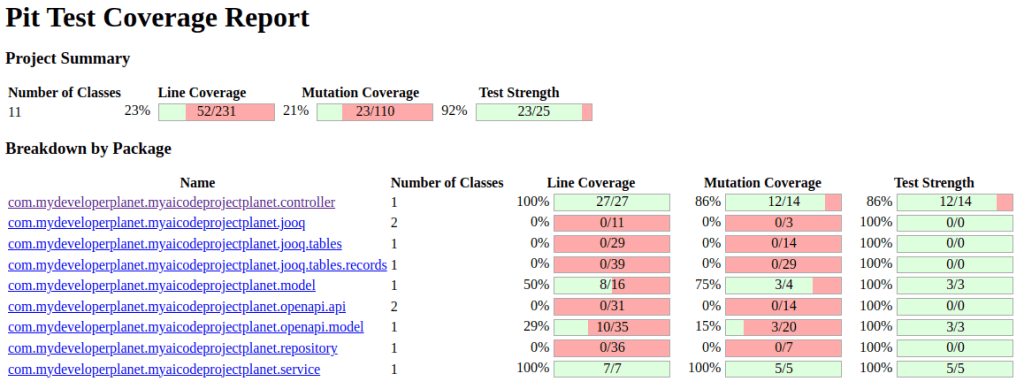
The mutation test result shows a 100% line coverage and an 100% mutation coverage for the service package.
5. Generate Repository Test
Let’s create a unit test for the CustomerRepository class.
5.1 Prompt
Open a new chat window and add the full project to the Prompt Context. Enter the prompt.
Write a unit test for class CustomerRepository using JUnit.
Use @JooqTest.
Use Testcontainers.
Use AssertJ assertions.
Use Mockito.
5.2 Response
The response can be viewed here.
5.3 Apply Response
Create package com.mydeveloperplanet.myaicodeprojectplanet.repository in directory src/test/java and copy the response in file CustomerRepositoryTest.
Add dependencies for Testcontainers to the pom:
<dependency>
  <groupId>org.testcontainers</groupId>
  <artifactId>postgresql</artifactId>
  <scope>test</scope>
</dependency>
<dependency>
  <groupId>org.testcontainers</groupId>
  <artifactId>junit-jupiter</artifactId>
  <scope>test</scope>
</dependency>
Also, @JdbcTest is used instead of @JooqTest. Fix this.
However, all tests fail. The error shows you that there is a problem with the datasource.
5.4 Prompt
Enter a follow-up prompt.
the following error occurs when running the tests:
<insert error here, left out for brevity>
5.5 Response
The response can be viewed here.
5.6 Apply Response
The response points you into the right direction. However, the solution is to add the following dependency to the pom.
<dependency>
    <groupId>org.springframework.boot</groupId>
    <artifactId>spring-boot-testcontainers</artifactId>
    <scope>test</scope>
</dependency>
And to replace the testcontainer setup as follows.
@Container
@ServiceConnection
public static PostgreSQLContainer<?> postgreSQLContainer = new PostgreSQLContainer<>("postgres:latest");
When running these tests, only the createCustomer test is successful. All other tests fail because the tests assume certain data is in the database.
5.7 Prompt
Open a new chat window, open the CustomerRepositoryTest and enter the prompt.
The tests make assumptions about data being present in the database.
Ensure that these preconditions can be met.
5.8 Response
The response can be viewed here.
This response is not very useful, it inserts data in the setUp method and it removes the data in the tearDown method, but by means of pure JDBC and not by means of jOOQ.
Add the following to the test.
@BeforeEach
public void setUp() {
    // Initialize the database schema and insert test data here if needed
    dslContext.insertInto(Customers.CUSTOMERS,
            Customers.CUSTOMERS.FIRST_NAME,
            Customers.CUSTOMERS.LAST_NAME)
            .values("Vince", "Doe")
            .execute();
}

@AfterEach
public void tearDown() {
    dslContext.truncateTable(CUSTOMERS).cascade().execute();
}
Run the tests, all are successful.
5.9 Test Quality
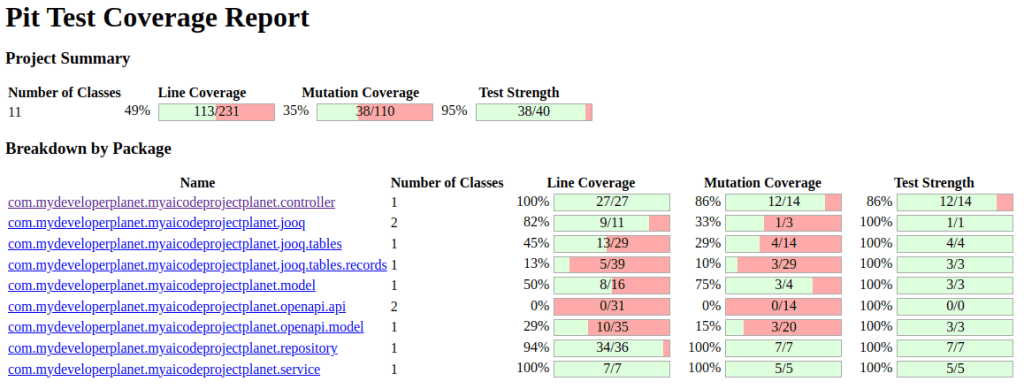
This is an integration test and mutation tests do no go well with integration tests. However, just give it a try and you can see that the mutation test result shows a 94% line coverage (the RuntimeExceptions are not tested) and a 100% mutation coverage for the repository package. The tests can be improved, but this initial result is already very good.
6. Generate Integration Test
Let’s create an integration test for the Spring Boot application.
6.1 Prompt
Add the full project to the Prompt Context and enter the prompt.
Write an integration test using JUnit.
Use SpringBootTest.
Use Testcontainers.
Use WebTestClient.
Use AssertJ.
6.2 Response
The response can be viewed here.
6.3 Apply Response
For each CRUD operation a test is included, that is good.
You need to add the webflux dependency to the pom.
<dependency>
    <groupId>org.springframework.boot</groupId>
    <artifactId>spring-boot-starter-webflux</artifactId>
    <scope>test</scope>
</dependency>
Still some issues exist:
- Testcontainers are not used.
- Again, the setup is empty.
testCustomersGetandtestCustomersIdGetdo not compile.
6.4 Prompt
Enter the follow-up prompt.
testCustomersGet does not compile, the `first` method does not exist.
testCustomersIdGet does not compile, the `satisfies` method cannot be invoked.
Fix these issues.
6.5 Response
The response can be viewed here.
6.6 Apply Response
The response is not helpful. Fix it manually.
@Test
public void testCustomersGet() {
    webTestClient.get()
            .uri("/customers")
            .accept(MediaType.APPLICATION_JSON)
            .exchange()
            .expectStatus().isOk()
            .expectBodyList(Customer.class)
            .hasSize(1) // Assuming there is one customer in the database for testing
            .consumeWith(response -> {
                List<Customer> customers = response.getResponseBody();
                assertThat(customers).isNotNull();
                assertThat(customers).hasSize(1);
                Customer customer = customers.get(0);
                assertThat(customer.getId()).isEqualTo(1L);
                assertThat(customer.getFirstName()).isEqualTo("Vince");
                assertThat(customer.getLastName()).isEqualTo("Doe");
            });
}
And for testCustomersIdGet.
@Test
public void testCustomersIdGet() {
    webTestClient.get()
            .uri("/customers/1")
            .accept(MediaType.APPLICATION_JSON)
            .exchange()
            .expectStatus().isOk()
            .expectBody(Customer.class)
            .consumeWith(response -> {
                Customer customer = response.getResponseBody();
                assertThat(customer).isNotNull();
                assertThat(customer.getId()).isEqualTo(1L);
                assertThat(customer.getFirstName()).isEqualTo("Vince");
                assertThat(customer.getLastName()).isEqualTo("Doe");
            });
}
Also add Testcontainers and the setUp and tearDown methods, just like in the CustomerRepositoryTest.
Run the tests. All tests succeed except testCustomersIdGet and testCustomersGet. This is due to the fact that it is assumed that the inserted data in the setUp method contains an ID equal to 1. This is not true.
Fix this manually by storing the id in a variable insertedId and fix the tests accordingly.
Another thing which is not entirely correct is the use of com.mydeveloperplanet.myaicodeprojectplanet.model.Customer instead of com.mydeveloperplanet.myaicodeprojectplanet.openapi.model.Customer. Also fix this manually.
And the test should run at a random port.
@SpringBootTest(webEnvironment = SpringBootTest.WebEnvironment.RANDOM_PORT)
Run the tests, all are successful. They probably can be improved, but the skeleton is correct.
6.7 Test Quality
The overall test quality did not improve much, but this is not the goal of the integration test.

8. Conclusion
Generating unit (integration) tests works very well. You do need to tell the LLM which frameworks, dependencies, etc. you would like to use. Many are available and if you do not specify it clearly, the LLM will just choose one for you. Sometimes, manual intervention is needed to fix some issues.
Discover more from
Subscribe to get the latest posts sent to your email.
 mydeveloperplanet.com